> ## Documentation Index
> Fetch the complete documentation index at: https://udcore.unrealdirective.com/llms.txt
> Use this file to discover all available pages before exploring further.
# AI
### MoveToLocation
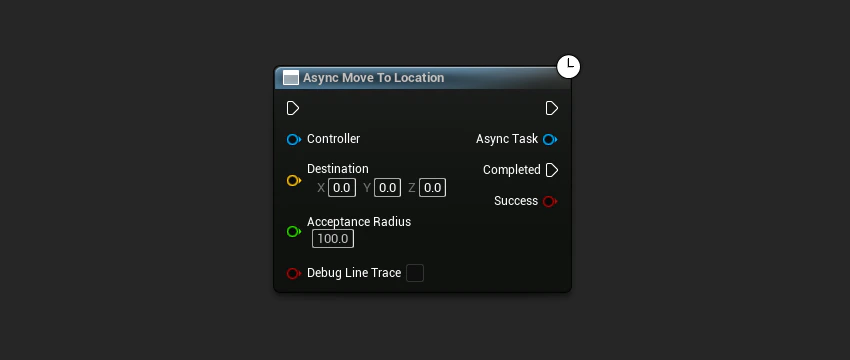
Moves the actor to the specified location. When the movement has succeeded or failed, the Completed delegate is called with success/failure.
 ```cpp theme={null}
#include "AI/UDAT_MoveToLocation.h"
#include "GameFramework/Controller.h"
#include "GameFramework/Actor.h"
void AExampleCharacter::MovePlayerToLocation()
{
UWorld* World = GetWorld();
AController* Controller = GetController();
const FVector Destination(100.0f, 200.0f, 300.0f);
constexpr float AcceptanceRadius = 100.0f;
constexpr bool bDebugLineTrace = false;
UUDAT_MoveToLocation* MoveToLocationTask = UUDAT_MoveToLocation::MoveToLocation(
World,
Controller,
Destination,
AcceptanceRadius,
bDebugLineTrace);
if (MoveToLocationTask)
{
MoveToLocationTask->Completed.AddDynamic(this, &ThisClass::OnMoveToLocationCompleted);
}
}
void AExampleCharacter::OnMoveToLocationCompleted(bool bSuccess)
{
// Called when UUDAT_MoveToLocation has completed with either a success or fail.
// Add your logic here.
}
```
**Inputs**
The world context object.
The controller to move.
The vector location to move to.
The radius around the destination location that is considered acceptable. Be sure to set this to a reasonable value as the controller may never reach the exact destination.
* Default: 100.f
Display a line trace to the destination location for a short duration.
**Outputs**
The async task instance.
```cpp theme={null}
#include "AI/UDAT_MoveToLocation.h"
#include "GameFramework/Controller.h"
#include "GameFramework/Actor.h"
void AExampleCharacter::MovePlayerToLocation()
{
UWorld* World = GetWorld();
AController* Controller = GetController();
const FVector Destination(100.0f, 200.0f, 300.0f);
constexpr float AcceptanceRadius = 100.0f;
constexpr bool bDebugLineTrace = false;
UUDAT_MoveToLocation* MoveToLocationTask = UUDAT_MoveToLocation::MoveToLocation(
World,
Controller,
Destination,
AcceptanceRadius,
bDebugLineTrace);
if (MoveToLocationTask)
{
MoveToLocationTask->Completed.AddDynamic(this, &ThisClass::OnMoveToLocationCompleted);
}
}
void AExampleCharacter::OnMoveToLocationCompleted(bool bSuccess)
{
// Called when UUDAT_MoveToLocation has completed with either a success or fail.
// Add your logic here.
}
```
**Inputs**
The world context object.
The controller to move.
The vector location to move to.
The radius around the destination location that is considered acceptable. Be sure to set this to a reasonable value as the controller may never reach the exact destination.
* Default: 100.f
Display a line trace to the destination location for a short duration.
**Outputs**
The async task instance.